

Instructions how to use the OpenVPN plug-in with the Gnome NetworkManager.
Details:
– In this case the OpenVPN server hands out dynamic IP addresses.
– Ubuntu 12.10 64-bit client.
Get your user configuration file:
In a browser visit your OpenVPN server webpage at https://server.domain/
Follow Login > Download “Yourself (user-locked profile)” > Save As client.ovpn
** I renamed the file to client_29.ovpn since I have multiple servers I connect to.
Split client.ovpn into several files:
The Gnome NetworkManager does not like using one big configuration file, although the command line OpenVPN client does work fine with one file (client.ovpn). For NetworkManager you can break out manually with an editor or as follow. I used my personal home folder to store the files.
sed -n '//,/<\/tls-auth>/p' client_29.ovpn > sitename_ovpn_29tls.keysed -n '//,/<\/cert>/p' client_29.ovpn > sitename_ovpn_29.crtsed -n '//,/<\/ca>/p' client_29.ovpn > sitename_ovpn_29ca.cersed -n '//,/<\/key>/p' client_29.ovpn > sitename_ovpn_29.key** After you split the configuration up remember to edit the files and remove the lines containing the open <> and close </> tags.
Install the OpenVPN plugin for NetworkManager:
# aptitude install network-manager-openvpn-gnomeBelow are some screen shots showing some configuration settings fro this particular setup. Your mileage may vary depending on how your administrator configured the server.
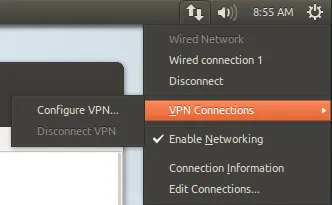
Add a new VPN Connection in GNOME:
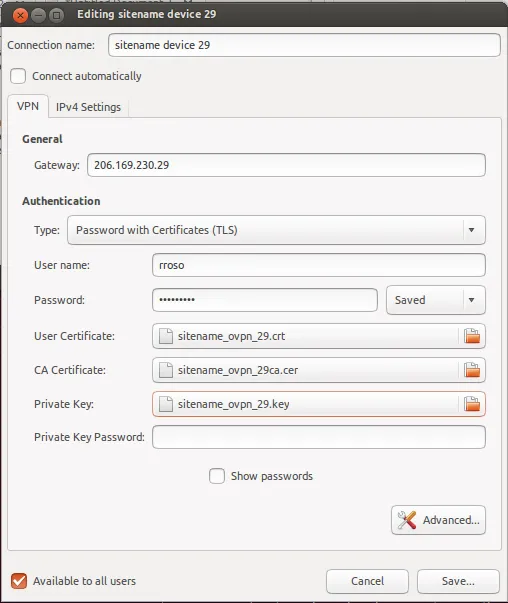
Reference certificates and keys:
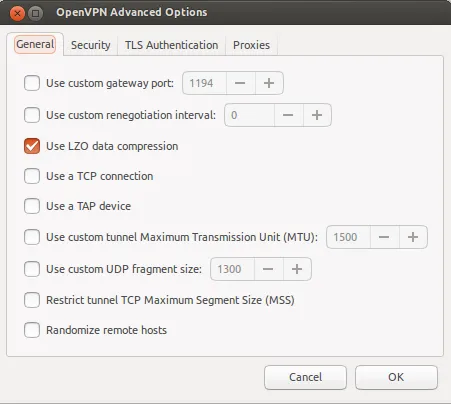
General Settings:
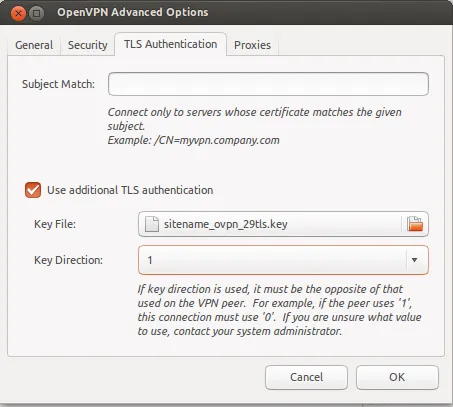
TLS Key:
Showing syslog while connecting (snipped):
Nov 22 08:49:42 u12 NetworkManager[660]: Starting VPN service 'openvpn'...Nov 22 08:49:43 u12 nm-openvpn[4791]: Control Channel Authentication: using '/home/rrosso/sitename_ovpn_29tls.key' as a OpenVPN static key fileNov 22 08:49:43 u12 nm-openvpn[4791]: LZO compression initializedNov 22 08:49:47 u12 NetworkManager[660]: IPv4 configuration:Nov 22 08:49:47 u12 NetworkManager[660]: Internal Gateway: 172.22.91.1Nov 22 08:49:47 u12 NetworkManager[660]: Internal Address: 172.22.91.253Nov 22 08:49:47 u12 NetworkManager[660]: Internal Prefix: 24Nov 22 08:49:48 u12 NetworkManager[660]: VPN connection 'sitename device 29' (IP Config Get) complete.Nov 22 08:49:48 u12 NetworkManager[660]: ((null)): writing resolv.conf to /sbin/resolvconfNov 22 08:49:49 u12 dbus[402]: [system] Activating service name='org.freedesktop.nm_dispatcher' (using servicehelper)Nov 22 08:49:52 u12 nm-openvpn[4791]: Initialization Sequence CompletedNov 22 08:50:08 u12 ntpdate[4876]: step time server 91.189.94.4 offset 9.301349 secOlder (pre Ubuntu 12.04) information. May or may not be useful to you.
How to test a manual connection(no Network Manager plug-in):
rrosso@u10:~$ sudo openvpn --config client.ovpn --script-security 2Sat Mar 19 10:14:34 2011 OpenVPN 2.1.0 x86_64-pc-linux-gnu [SSL] [LZO2] [EPOLL] [PKCS11] [MH] [PF_INET6] [eurephia] built on Jul 12 2010Enter Auth Username:rrossoEnter Auth Password:...Older versions of Ubuntu and NetworkManager this was a necessary addition to set DNS:
rrosso@u10:~$ tail -3 client.ovpn#rrosso added for DNS resolverup /etc/openvpn/update-resolv-confdown /etc/openvpn/update-resolv-confSeveral problems I encountered with permissions on older versions:
– NetworkManager: <WARN> vpn_service_watch_cb()
– VPN service ‘org.freedesktop.NetworkManager.openvpn’ exited with error: 1
– connection_need_secrets_cb()
https://bugs.launchpad.net/ubuntu/+source/network-manager-openvpn/+bug/360818
Debug NetworkManager as follow:
http://live.gnome.org/NetworkManager/Debugging
# OPENVPN_DEBUG=1 /usr/lib/network-manager-openvpn/nm-openvpn-servicehttp://bugs.debian.org/cgi-bin/bugreport.cgi?bug=527975
https://bugs.launchpad.net/ubuntu/+source/network-manager-vpnc/+bug/360818
** Not sure if tinkering with this next file helped but changed it to look as follow and could at least troubleshoot further after wards.
Permissions problem:
# cat /etc/dbus-1/system.d/nm-openvpn-service.conf
<busconfig><policy user="root"><allow own="org.freedesktop.NetworkManager.openvpn"/><allow send_destination="org.freedesktop.NetworkManager.openvpn"/></policy></busconfig>** I restored the original file and things are still working
Some older links on DNS resolver and OpenVPN:
http://www.subvs.co.uk/openvpn\_resolvconf
http://forums.openvpn.net/topic7109.html